Load Data From a Specific Time Range
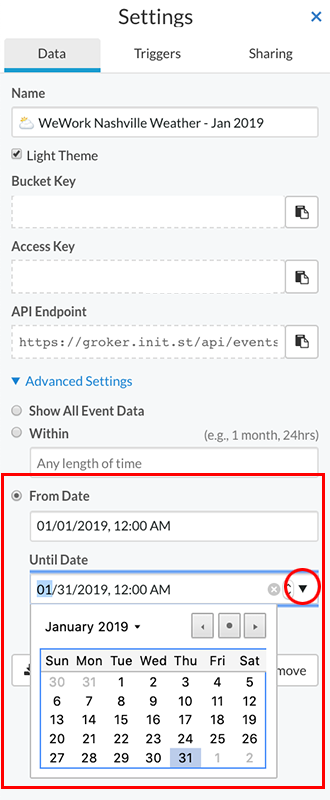
To limit loading data to a specific time range (e.g. 01/01/2019 - 01/31/2019):
- Click the "settings" link underneath the bucket name on the bucket shelf.
- Under the "Data" tab, click "Advanced Settings".
- Check the "From Date" option.
- Select the "From Date" and "Until Date" by either typing in the date/time (e.g. 01/01/2019, 12:00 AM) or using the date picker by clicking on the down arrow on the right of each field.
- Click "Done" to close the bucket settings.
- Refresh the browser to view your changes.
*note: This option can be used in conjunction with the "Create Multiple Dashboards from One Data Bucket" option (more info) to create time range "reports" from a streaming data bucket.
*note: The Statistics data view type (more info) can be a useful feature when creating time range reports (e.g. average temperature in January).